Web Performance TTI and TTFR
In Traveloka, TTI is defined as:
The time duration from when the user navigation occurs up to a single point where the most important UI block (based on product definition) is being shown and responsive.
TTFR is defined as:
The time duration from when the user navigation occurs up to the first paint is being shown
Both TTI and TTFR are collected and uploaded to datadog logs. The TTFR metrics are automatically collected in all pages. TTI metrics would only be uploaded if it is configured.
TTFR
TTFR metrics are automatically collected on all pages and sent to Datadog. No developer action is required. The following attributes are included in the TTFR data. The definition of ttfr event is the trigger time of domInteractive event, it is when the document has been parsed but sub-resources such as deferred and module scripts, images, stylesheets, and frames are still loading. Since Traveloka web pages are rendered in server, so once the document has been parsed, it will display the first paint of the web page.
If the page is activated via prerendered, then ttfr, ttDomInteractive, ttDomContentLoaded and ttVdom will be adjusted by activation start time.
| Property | Entry | Value Example | Description |
|---|---|---|---|
| Name | @name | web.performance.page.ttfr | datadog logs name |
| service | @service | webfpr-desktop, webpla-mobile | service name |
| page | @meta.pathname | /flight/fullsearch, /car-rental | next path |
| locale | @meta.route_prefix | en-id, en-en | locale |
| result | @props.result | 'success', 'timeout' | ttfr result |
| app_version | @props.app_version | release_webgtr_20251112-e17b158559 | app version |
| ttfr | @props.time | 200, 300, 500 | time to first render |
| redirectCount | @props.redirectCount | 0, 1, 2 | redirect count |
| redirect | @props.redirect | 0, 200 | redirect duration |
| dns | @props.dns | 0, 200 | dns lookup duration |
| tcp | @props.tcp | 0, 200 | tcp connection duration |
| tls | @props.tls | 0, 200 | tls negotiation duration. |
| serverLatency | @props.serverLatency | 200, 800 | response start-request start |
| htmlDownload | @props.htmlDownload | 200, 800 | respond end - response start |
| ttfr | @props.ttfr | 200, 800 | time to first paint |
| ttDomInteractive | @props.ttDomInteractive | 200, 800 | time to DOM parsed |
| ttDomContentLoaded | @props.ttDomContentLoaded | 200, 800 | time to domContentLoaded |
| ttVdom | @props.ttVdom | 200, 800 | time to Tvlk App Mounted. |
| isPrerender | @props.isPrerender | true, false | is it a prerender page. |
| activationStart | @props.activationStart | 0, 300 | page activation start in ms |
TTI
TTI is defined as the duration from user navigation to the most important UI shown. The definition of the most important UI should be decided by product developers.
Tvlk web pages are built from many reusable components, and these components can appear on multiple pages. It is difficult to define TTI strictly at the page level from an implementation standpoint. As a result, we define TTI for Traveloka web pages by first collecting the render times of individual widgets. Then, based on the page-level TTI strategy defined by product developers, we determine the appropriate moment to upload the page TTI.
Widget render times are recorded by calling markWidgetRender, which signals that a widget has finished rendering. For further details, refer to the API section in the following paragraphs. Here are some explanations about TTI triggering.
- When
renderAllstrategy is used,page TTIis considered as failed if any of the widget is marked as failed. WhenrenderAnystrategy is used,page TTIis considered as failed if the first widget is marked as failed.- The definition of widget render failure is delegated to product team developers. General suggestions for widget render failures include: widget not rendered due to API fetching error, widget runtime error, dynamic loaded widget downloading failure
- A page TTI is considered timed out if the page TTI conditions are not met within the timeout period (30 seconds by default).
- Only one page TTI event is sent per loaded load. If a page uses
renderAnystrategy, its TTI will be marked as success if the first widget is marked as success, but the following widgets are marked as failed.
We choose to both upload datadog logs and datadog metrics for web page TTI. Datadog logs provide a wide variety of properties, which is useful for developers to dive into the data and investigate. Meanwhile, Datadog metrics are more accurate and can be used for SLO directly.
TTI Datadog Logs
Below is a table for all the attributes in tti datadog logs.
- For widgets with the same name, only one widget render event is sent per loaded page.
- page TTI and widget render event are differentiated by @props.widget. If @props.widget is 'page', then it is page TTI event, otherwise it is widget render event.
| Property | Entry | Value Example |
|---|---|---|
| Name | @name | web.performance.page.tti |
| service | @service | webfpr-desktop, webpla-mobile |
| page | @meta.pathname | /flight/fullsearch, /car-rental |
| locale | @meta.route_prefix | en-id, en-en |
| result | @props.result | 'success', 'timeout', 'failure' |
| app_version | @props.app_version | release_webgtr_20251112-e17b158559 |
| tti | @props.time | 500, 350, 980 |
| widget | @props.widget | 'page', 'flight.searchResult', 'flight.airlineFilter' |
| message | @props.message | A string explaining why timeout or fail |
| isPrerender | @props.isPrerender | true, false |
| activationStart | @props.activationStart | 0, 300 |
| pageType | @props.pageType | default, empty_result, accom_auto_change_date, accom_auto_change_date_empty_result |
TTI Datadog Metrics
Below is a table for all the attribtes in tti datadog metrics. Please notice only page tti will be uploaded. Widget render times are not uploaded. The actual page ttis uploaded needs to be registered in https://github.com/traveloka/bei-observability-platform repository. Initially, only critical pages in the main funnel will be recorded. For a more detailed information of whether the page has been recorded, please track this repository.
| Property | Value Example |
|---|---|
| Metric Name | web.performance.page.tti |
| country | 'id', 'au' |
| interface | 'desktop', 'mobile' |
| service | webfpr-desktop, webpla-mobile |
| page | /flight/fullsearch, /car-rental |
| result | 'success', 'timeout', 'failure' |
| isPrerender | true, false |
API
ITTIConfig
To activate page TTI upload, first define TTI configs.
/**
 * Example: packages/flight/app-desktop/tti.js
 */
import { ITTIConfig } from '@traveloka/core'
const ttiConfig: ITTIConfig = {
    /**
     * widget name must be in the form of [domain.widgetName]
     * all widget names used in strategies must be defined in widgets first
     */
    widgets: [
        'flight.searchForm',
        'flight.searchResultFilter'
    ],
    strategies: {
        '/flight/airline/[airline]': {
            'name': 'ttfr',
            /**
             * default TTI timeout is 30 seconds. we change it to 20 for this page.
             */
            timeout: 20
        },
        '/flight': {
            'name': 'renderAny'
        },
        '/flight/multicitysearch': {
            'name': 'renderAll',
            'widgets': ['flight.searchForm', 'flight.searchResultFilter']
        }
    }
}
Then we pass the config to App component:
// packages/flight/app-desktop/pages/_app.tsx
import ttiConfig from '../tti';

const TravelokaApp = withTravelokaAppTRPC();

export default function App(props: any) {
  return (
    <BMNotificationBannerProvider>
      <TravelokaApp {...props} ttiConfig={ttiConfig} />
    </BMNotificationBannerProvider>
  );
}
ITTIConfig.widgets
An array of widgets referenced in ttiConfig.strategies. The sole purpose of this property is to centralize all widgets widgets used by a product, making it easier for developers to review the list of widgets used for page TTI calculation.
Widget name must be in the form of [domain].[widgetName]. Use this format to prevent name collision between products. All widget names used inside ttiConfig.strategies must be listed in ttiConfig.widgets first.
ITTIConfig.strategies
A map of TTI strategy of each next route. The key is next route name. The value contains a name field, which must be one of the three values:
- ttfr: when name equals
ttfr, the page TTI is equal to page ttfr - renderAny: when any of the widgets in
widget listis rendered, page TTI is triggered. Whenwidget listis not provided, then one any of widgets is rendered, page TTI is triggered. - renderAll: when all of the widget in
widget listis rendered, page TTI is triggered.
Developer could also set a different timeout value for a page. The default timeout value is 30(seconds).
Note: Use TTFR for widgets included in the initial server-side HTML. However, because React hydration occurs after TTFR, only use this strategy if the widget functions without immediate event listeners. For example, do not use TTFR if the user needs to interact with a calendar selector right away
typeSafeMarkWidgetRenderWrapper
// definition

import { typeSafeMarkWidgetRenderWrapper } from '@traveloka/core';

const USER_WIDGET = ['user.externalForm', 'user.externalFalseForm'] as const;

export type UserWidgets = (typeof USER_WIDGET)[number];
const markWidgetRender = typeSafeMarkWidgetRenderWrapper<UserWidgets>();

markWidgetRender('user.externalForm', 'success');
markWidgetRender('user.externalForm', 'failure');
markWidgetRender(
  'user.externalFalseForm',
  'failure',
  'search/initial fetch failed'
);
mark a widget as rendered. The result could be either success or failure. If the result is failure, then the page TTI would also be marked as failure. The message would be uploaded when the widget is rendered as failed.
setTTIContext
Call this function to update page type. If this function is not called, the page type is 'default'. It is used to differentiate different render routes and let developers know the TTI metrics under different render routes.
For instance, flight team developers might want to know the TTI number for page with results and page with empty results respectively.
The initial values of pageType include 'default' and 'empty_result'.
If you want to add more pageTypes, please update the value in packages/core/tti/types.ts
import { markWidgetRender, setTTIContext } from '@traveloka/core';

// call this function before page tti is triggered

setTTIContext({ pageType: 'empty_result' });
// Track the widget render
if (status === 'failure' && errorMessage) {
  markWidgetRender(fullWidgetName, 'failure', errorMessage);
} else {
  markWidgetRender(fullWidgetName, status);
}
TTFR custom context via ttfrSSRContext
To attach custom metadata to the TTFR log event (visible as @props.custom in Datadog), pass a ttfrSSRContext object through __NEXT_DATA__ from the server. At upload time TTFRMeasure reads window.__NEXT_DATA__.props.pageProps.ttfrSSRContext via getTTFRSSRContext.
This is the recommended approach because TTFR fires very early in the page lifecycle — before most React effects run — so server-injected data is the most reliable way to supply context.
// In your Next.js page (getServerSideProps / getStaticProps / cacheableServerProps)
return {
  props: {
    ttfrSSRContext: {
      isServerAPI: true,
      headAPIVariant: 'v2',
    },
  },
};
The value must be a flat record of primitive values (Record<string, string | number | boolean | null>). Whatever is set here will appear verbatim under @props.custom in the TTFR Datadog log entry.
TTI Dev Tool
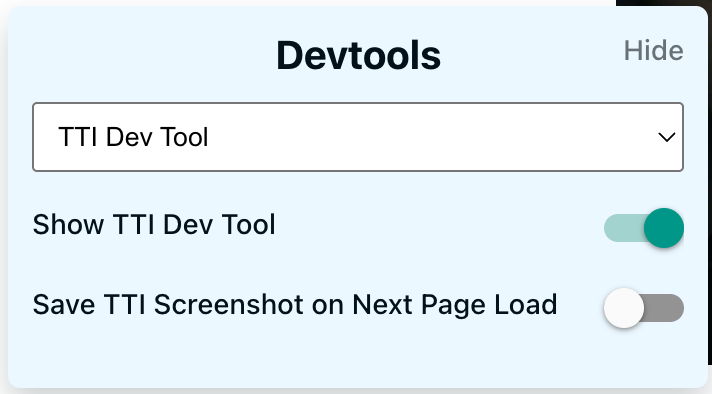
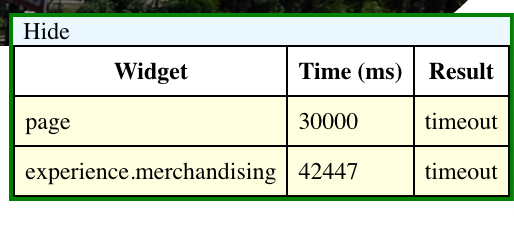
You can switch on TTI Dev tool to help you visualize the trigger points of widget render and page TTI. So in Dev Tool, you could select TTI Dev Tool, and there are few options:
- Show TTI Dev Tool: open or hide TTI dev tool floating window
- Save TTI Screenshot: save page screenshort when page TTI is invoked. If by the time you turn on the switch, the page has already trigger its TTI, then it won't save screenshot for the current session. You could refresh the page, and have a screenshort downloaded in the following session.
TTI Breakdown (RUM Vitals)
TTI Breakdown sends fine-grained timing vitals to Datadog RUM, giving visibility into what happens between navigation start and TTI. These vitals appear as duration vitals and timings in the Datadog RUM dashboard, allowing you to build waterfall-style views of page load.
Note: All the metrics in TTI Breakdown are measured from navigation start, instead of activation start, including TTFR and TTI, which are adjusted to activation start in TTFR and TTI measurement. Use adjusted for all breakdowns will make it unintuitive to view the actual durations of vitals.
Automatic Vitals (No Product Code Needed)
The following vitals are recorded automatically for every page that has TTI configured:
TTFR Phase Vitals
These vitals break down the time from navigation start to first render:
| Vital Name | Start | Duration / Description |
|---|---|---|
request_start | performance.timeOrigin | Time from timeOrigin to HTTP request start |
server_latency | After request_start | responseStart - requestStart (server processing) |
html_download | TTFB (response start) | responseEnd - responseStart (HTML transfer) |
dom_parsing | After HTML download | DOM construction time until domInteractive |
TTFR | At domInteractive | Zero-duration marker, description = result |
before_hydration | At domInteractive | Time between domInteractive and React hydration start |
hydration | At React hydration start | React hydration duration (Next.js-hydration measure) |
vdom_mounted | When TravelokaApp mounts (useEffect) | Zero-duration marker indicating VDOM is mounted |
Internal Process Vitals
These mark one-time internal processes that happen before or during API calls:
| Vital Name | Description |
|---|---|
ssg_preflight | Token fetching for SSG pages (first API call only) |
aws_challenge | AWS WAF silent challenge script loading (first API call) |
device_identifier_registration | Device identifier generation and registration |
TTI Marker
| Vital Name | Description |
|---|---|
TTI | Zero-duration marker recorded when page TTI resolves (any strategy) |
Instrumenting API Calls with rumAPIs
To track API call durations as RUM vitals, add a rumAPIs array to any TTI strategy in your tti.ts config. API paths in this list will be automatically instrumented by callAPIClientSide — no changes needed in your page or component code.
// packages/flight/app-desktop/tti.ts
import { ITTIConfig } from '@traveloka/core';

const ttiConfig: ITTIConfig = {
  widgets: [...FLIGHT_TTI_WIDGETS],
  strategies: {
    '/flight/fullsearch': {
      name: 'renderAll',
      widgets: ['flight.searchResult.SEARCH'],
      timeout: 30,
      // API paths to track as RUM vitals
      rumAPIs: ['/v2/flight/search/initial', '/v2/flight/search/poll'],
    },
  },
};
Each matching API call will produce a duration vital named with the API_ prefix. For example, /v2/flight/search/initial becomes API_v2_flight_search_initial (special characters are replaced with underscores).
The vital starts when callAPIClientSide is invoked and stops when the API response is received.
Instrumenting Dynamic Imports with RUM Vitals
You can track next/dynamic component loading durations as Datadog RUM duration vitals. The vital:
- Starts when the chunk with
webpackChunkNamebegins loading - Stops when the chunk finishes downloading
This produces a duration vital named DYNAMIC_<name> (e.g. DYNAMIC_MyComponent).
The vital name follows the webpackChunkName you set in the dynamic import. Infra listens to the chunk load start and duration, then uploads DYNAMIC_[webpackChunkName] as the vital name.
To enable dynamic component tracking per page, add dynamicComps to the page strategy in your TTI config. Each entry should match the webpackChunkName in the dynamic import:
// packages/flight/app-desktop/tti.ts
const ttiConfig: ITTIConfig = {
  strategies: {
    '/flight/fullsearch': {
      name: 'renderAll',
      widgets: ['flight.searchResult.SEARCH'],
      timeout: 30,
      dynamicComps: ['EntryPointOneWay', 'ScrollAwareDesktopHeaderV2'],
    },
  },
};
Example: FlightDeals with webpackChunkName
Add webpackChunkName to the dynamic import so infra can track the chunk by a predictable name.
import dynamic from 'next/dynamic';
const FlightDeals = dynamic(
  () =>
    import(
      '@traveloka/fpr-homepage/components/FlightDeals' /* webpackChunkName: "FlightDeals" */
    ),
  {
    loading: () => <>{'Loading....'}</>,
    ssr: false,
  }
);
Key points:
- Keep
webpackChunkNamealigned with thedynamicCompsentry in the TTI config. - Please follow the exact comment format below:
/* webpackChunkName: "You Component Name Here" */ - Check network tab to test if the chunk is named correctly.
Low-Level RUM Vital APIs
In addition to rumAPIs, three low-level functions are exported from @traveloka/core for custom instrumentation. Use these when you need to measure something that is not an API call or a dynamic import.
startRUMVital
Starts a new duration vital and returns a reference that must be passed to stopRUMVital to end it. Also records a timing mark at the start point.
import { startRUMVital } from '@traveloka/core';

const reference = startRUMVital('my_custom_operation', { once: true });
// ... do some work ...
Parameters:
| Parameter | Type | Description |
|---|---|---|
name | string | Name for the vital (sanitized: non-alphanumeric chars become _, leading _ removed) |
opts.once | boolean | If true, the vital is only recorded once per page load. Subsequent calls with the same name are no-ops and return null. |
opts.type | RUMVitalType (optional) | Prefix type: 'API' or 'DYNAMIC'. When set, the vital name is prefixed with API_ or DYNAMIC_ respectively. |
Returns: A vital reference object, or null if once: true and the vital has already been started.
stopRUMVital
Stops a previously started duration vital. Safe to call with null (no-op).
import { startRUMVital, stopRUMVital } from '@traveloka/core';

const reference = startRUMVital('my_custom_operation', { once: false });
// ... do some async work ...
stopRUMVital(reference);
Parameters:
| Parameter | Type | Description |
|---|---|---|
reference | ReturnType<typeof startRUMVital> | null | The reference returned by startRUMVital. If null, this is a no-op. |
addRUMVital
Records a completed vital with a known start time and duration. Use this when you already have both timestamps (e.g., from performance.getEntriesByType). Also records a timing mark at the start point.
import { addRUMVital } from '@traveloka/core';

// Record a vital that started 500ms ago and lasted 200ms
addRUMVital('data_processing', {
  startTime: Date.now() - 200,
  duration: 200,
  description: 'Processed search results',
});

// Record a zero-duration marker at the current time
addRUMVital('checkpoint_reached', {
  startTime: Date.now(),
  duration: 0,
});

// Record only once per page load
addRUMVital('first_interaction', {
  once: true,
  startTime: Date.now(),
  duration: 0,
});
Parameters:
| Parameter | Type | Description |
|---|---|---|
name | string | Name for the vital (sanitized the same way as startRUMVital) |
opts.startTime | number | Absolute start time in milliseconds (e.g., Date.now() or performance.timeOrigin + ...) |
opts.duration | number | Duration in milliseconds. Use 0 for point-in-time markers. |
opts.description | string (optional) | A description string attached to the vital (e.g., result status) |
opts.once | boolean (optional) | If true, the vital is only recorded once per page load. Defaults to false. |
opts.type | RUMVitalType (optional) | Prefix type: 'API' or 'DYNAMIC'. Typically omitted for custom vitals. |
Example: Measuring a Custom Operation
import { startRUMVital, stopRUMVital } from '@traveloka/core';

async function loadAndProcessData() {
  const ref = startRUMVital('load_and_process_data', { once: false });

  const data = await fetchData();
  processData(data);

  stopRUMVital(ref);
}
Example: Recording a Known Duration
import { addRUMVital } from '@traveloka/core';

// After measuring something with Performance API
const entries = performance.getEntriesByName('my-measure');
if (entries.length > 0) {
  const entry = entries[0];
  addRUMVital('my_measure', {
    startTime: performance.timeOrigin + entry.startTime,
    duration: entry.duration,
  });
}
Vital Naming Rules
All vital names are sanitized before being sent to Datadog RUM:
- Non-alphanumeric characters (except
_) are replaced with_ - Leading underscores are removed
- A type prefix is prepended based on the source:
API_for API call vitalsDYNAMIC_for dynamic import vitals- No prefix for TTFR phase vitals and internal process vitals
Local Development Verification
To verify that TTI Breakdown vitals are working in your local development environment, ensure the datadogRUMConfig block is present in packages/core/config/development.js:
// packages/core/config/development.js
datadogRUMConfig: {
  applicationId: '7d4ac777-b8ed-469a-882d-f302edeba889',
  clientToken: 'pub4b83d41b849ea5327216c53705ac8a63',
  sessionSampleRate: 100,
  sessionReplaySampleRate: 100,
  traceSampleRate: 100,
  defaultPrivacyLevel: 'mask-user-input',
},
This config enables Datadog RUM with 100% sampling, so every local page load is captured. After starting the dev server (pnpm dev), open the page you configured TTI for, then follow the steps below to verify the vitals in Datadog.
Viewing Vitals in Datadog
To view TTI Breakdown vitals in the Datadog RUM dashboard:
- Switch to the Dev environment in Datadog
- Navigate to Digital Experience > Real User Monitoring > Explorer
- Select Sessions to find your session, then drill into the View that matches the page you just loaded
- In the view detail panel, filter Event Type to Vitals
- You should see duration vitals such as
request_start,server_latency,html_download,dom_parsing,API_*,DYNAMIC_*, and timing markers likeTTFR,TTI,vdom_mounted
Fore more information, please refer to this RFC: https://traveloka.sg.larksuite.com/wiki/Hcm1wlDixidrr0k1cQalcz39gPb