TVLK5 Next.js Architecture
In a nutshell, TVLK5 is an SDK to help you build pages interacting with backend without having to think complex process like authentication etc. Instead of providing new paradigms to write code, we stay close to Next.js and React and only provides modules to interract with the rest of Traveloka ecosystem.
Page architecture
Each Next.js page is essentially a component that have access to various global data through React hooks and Next.js functions, as you can see in the data diagram below.
Note that a page have (1) Traveloka app "context" provided automatically through the contexts embedded within the TVLK5 framework, (2) the "props" that you write through data-fetching functions, and (3) "config" data.
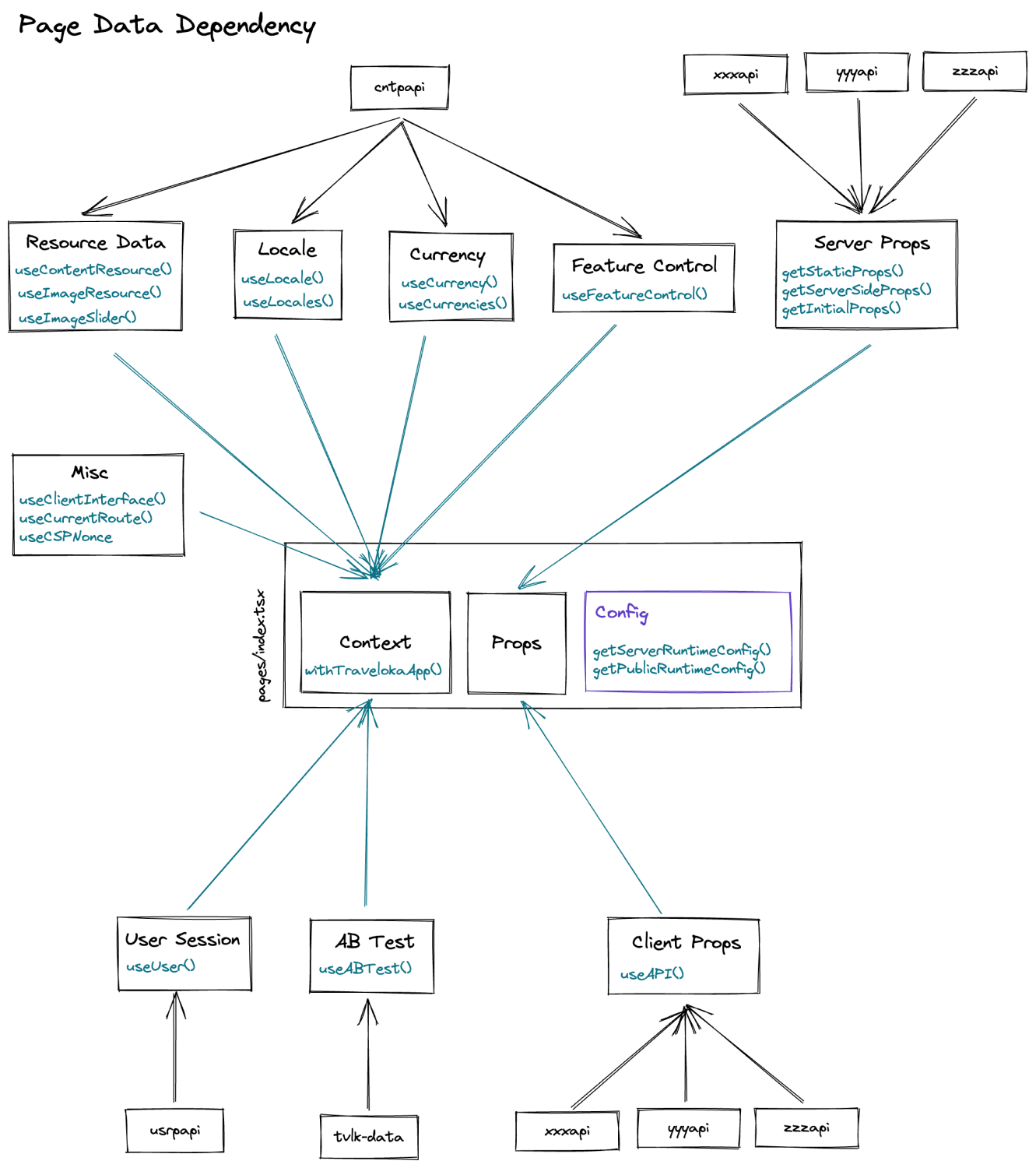
Page props/data
There are 3 kind of data: server data, client data, and config. They are accessed through different means, but most of them are through React context. These values are rarely changed except current route. We also have a Devtools UI that provides access to change some of those values.
Server data
Server data comes from the backend API (or fallback if any). We have resource data for translation, locale, currency, and feature control. Some pages might also have server data from their own backend API.
Even though Next.js has a concept of SSG where the page is statically generated in build time, this is not the case for us. Our CI strips any build time data (including prebuilt HTML). This is because we only build our app once, but it needs to be served in two different environment: staging and production.
We rely on Next.js Incremental Static Regeneration logic (that renders the page when it is visited for the first time), to make sure that in both environment the page renders correctly.
Users have four options to fetch data:
-
ISR: Typically called SSG, this is the most recommended way to fetch data inside a page. Page will be cached based on
revalidateproperties (if usingstaticPropsfunction it defaults to 10 minutes) -
SSR (getServerSideProps): This is the recommended way of serving truly dynamic page.
-
Legacy SSR (getInitialProps): This is the most common SSR setup in our repository because when we first started the TVLK5 project, the only data fetching method is
getInitialProps. Nowadays, these pages can be identified by itswithTravelokaPageexport. This is now the least recommended way to do SSR because of the double rendering logic which enables some magic APIs at the cost of much slower TTFB and client bundle issue. -
API Routes (pages/api/*): Another recent addition that allow product to optimize their backend API in server (instead of in client) to reduce bundle usage that comes from API transformation logic.
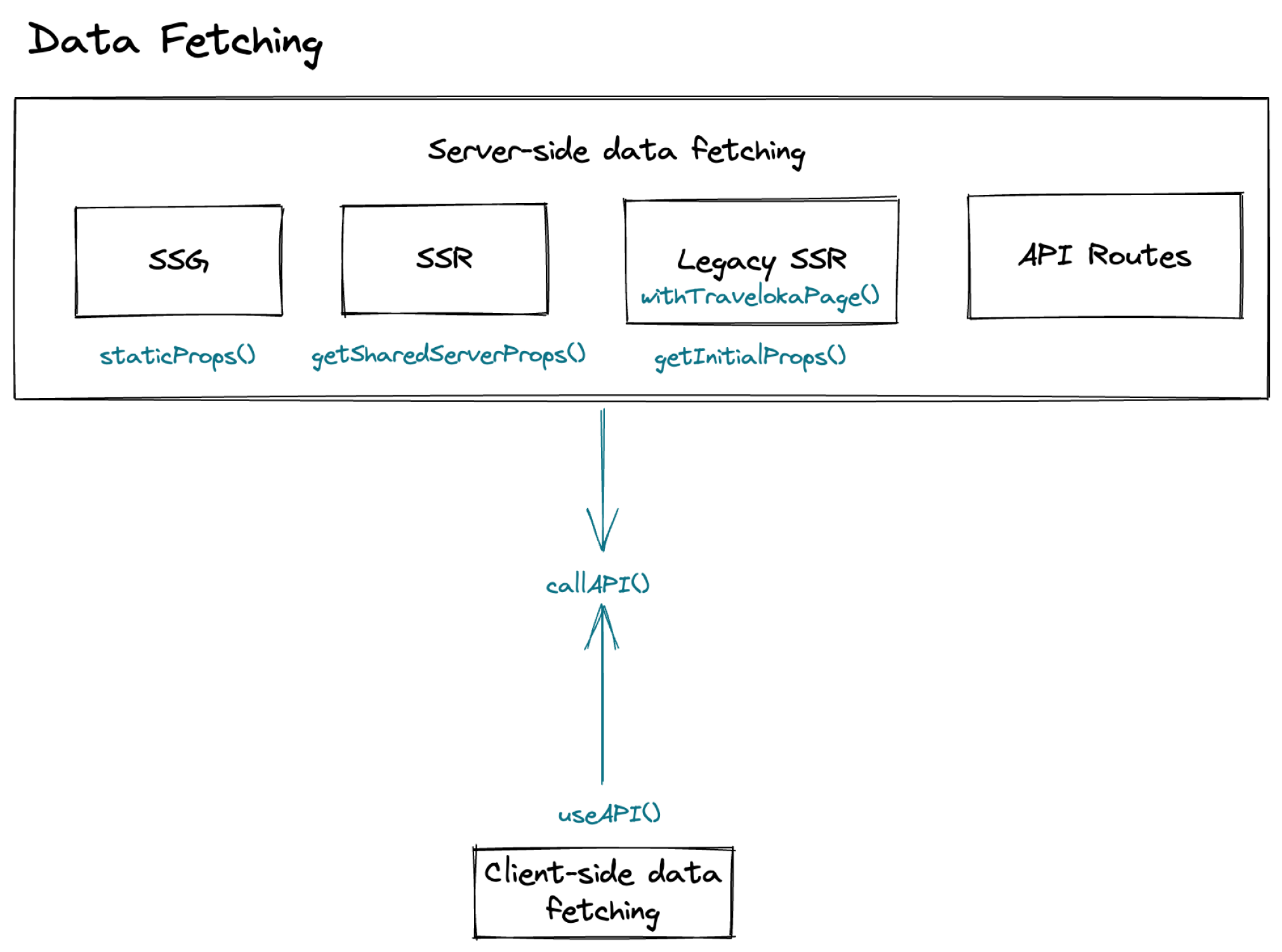
Client data
This is the same in staging and production, in which the data comes from the backend through API proxy.
The API proxy is what's different between staging and production. Even though all pages are "dynamic" (via ISR), we still fetch the user data in client-side to make sure that the server response can be cached (i.e., we can use the same response to other users with different session identifier).
The trade-off of making the page cacheable this way is that any UI that relies on user data will have to wait for hydration and user backend API response to display the UI correctly. We also have optimization in place where we cache user logged in state in browser storage to help reduce the time to render user-dependent UI.
Config
The last type of data is config. These values are only dynamic in a sense that it relies on environment variable. This means config change will only be reflected after the server is restarted.
API call lifecycle
Any API calls in client-side (whether via useAPI or callAPI) follow the same steps.
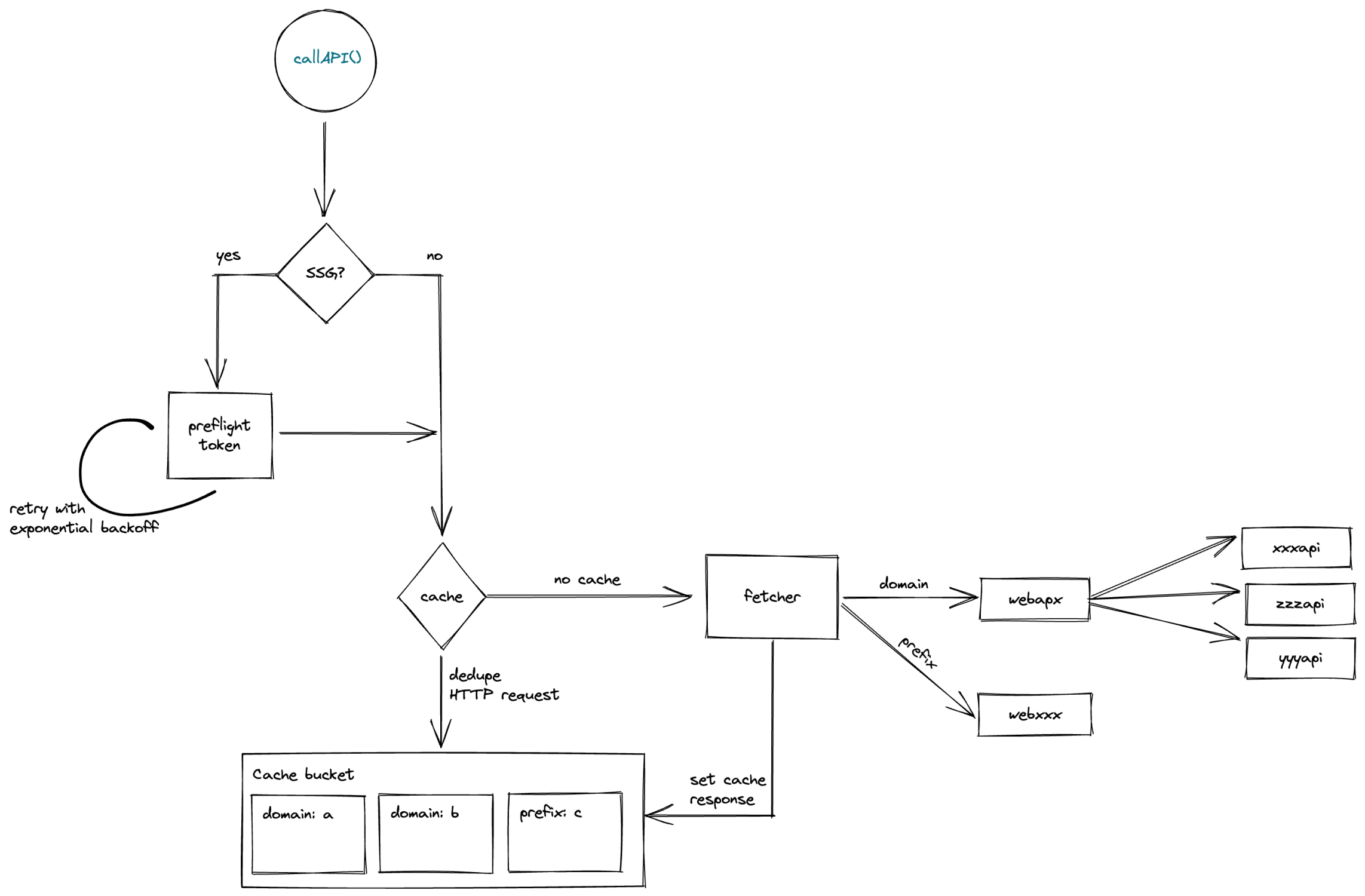
First we'll check whether the current page is ISR/SSG. This is because in ISR/SSG case, user might not have necessary session identifier (tvLifetime and tvSession cookie). Then it will check whether the API has a caching options and check the cache bucket (separated by product domain, or API routes prefix). If the cache exists, it will immediately returned the cached response.
If the cache options is specified but the cache is nonexistent, it will try to dedupe all the API requests matching the same cache key. This makes sure that any duplicate cached request will arrive at the same time and only triggers single network request
The fetcher than determine whether to hit API proxy or API routes based on the prefix or domain field. The response is then cached if requested.
Client-side navigation
In this section, domainPrefix refers to the prefix field inside package.json, which was used by our legacy routing behavior. We now have a more sophisticated routing via webrtr, but this relic of the past has not been updated.
Client-side navigation should work as expected, but due to how Next.js generates /_next/data/* JSON URL for client-side navigation, it might not. In general, if your routes are handled using domain prefix + wildcard (e.g. /discovery*), it should be fine.
To explain why, we're going to show you how we make client-side navigation possible (this also applies to fallback: true as well.)
Client-navigation flow
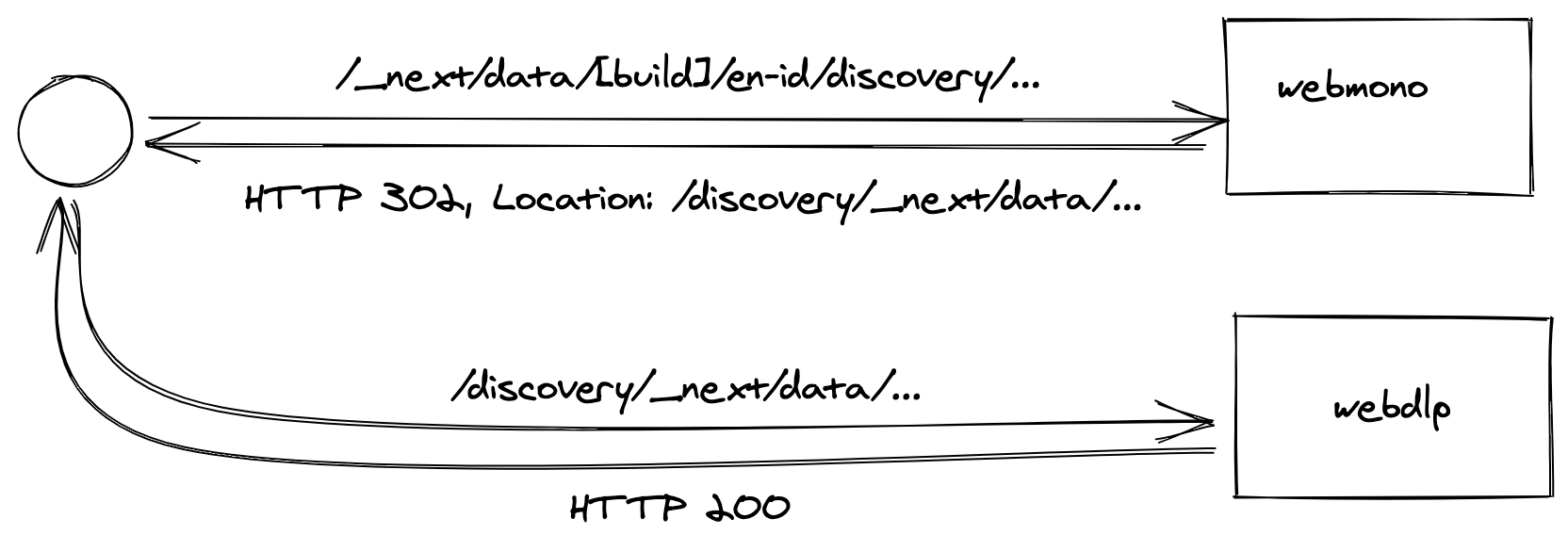
1./ First, Next.js will generate a URL with this format: /_next/data/[buildId]/[localePrefix]/[domainPrefix]/[...path].json.
If you're navigating to /en-id/discovery/AA/AA_LP, for example, Next.js will send a GET request to /_next/data/[buildId]/en-id/discovery/AA/AA_LP.json. Note that this route won't hit webdlp because /_next/data/* is handled by webstd and not webdlp (you can verify this in route.yml).
To fix this, we've prepared a handler in webstd that will redirect said url to /[domainPrefix]/_next/data/[buildId]... (or /discovery/_next/data/[buildId]... in this case).
Note that /discovery/* is handled by webdlp, so webdlp then will receives the URL, rewrite this back to /_next/data/[build]... (see packages/core/server/nextJSMiddleware.ts), and process the request.
The image below should now say webstd instead of webmono.
Fallback to server-side navigation
The issue happens if you're doing client-side navigation to a page with "partial routing", i.e., a situation with the following pattern:
/booking/v2handled bywebpla/booking/*handled bywebmono
For example, if you do client-navigation to /booking/v2 in webpla, we will rewrite the route to /booking/_next/data which will now be handled by the wrong service, which will return 404.
Fortunately, Next.js will fall back to server-side navigation on this case, and the user will still end up with the correct page. But if you're wondering why it's not a client-side navigation, now you know.
Pages with getInitiapProps
Note that this doesn't affect navigation to pages with getInitialProps as Next.js doesn't generate any /_next/data requests.