Protecting Access to Specific Routes
This feature is not available in SSG pages (obviously).
Not all routes are treated equal. Sometimes you need user to have some level of authorization to be able to visit some routes. Another times, there are new products only released internally via feature control.
In the past (with our legacy pages), we add route-protection behavior via the routeProtection page property. Now, with SSR pages (using getServerSideProps), you can directly access the required contexts via ctx.req or getSharedServerProps.
SSR pages with getServerSideProps
Handle the logic inside the getServerSideProps data-fetching function.
For example, when you want to route off a request based on a feature control setting:
export const getServerSideProps: GetServerSideProps = async (ctx: GetServerSidePropsContext) => {
  const expressRes = ctx && (ctx.res as Response);
  const sharedPageProps = await getSharedServerProps(ctx);
  const { rawAppContext } = sharedPageProps;

  // Check feature control
  const missionCatalogueDetailFc: FeatureControl = rawAppContext.?.['mission-catalog-detail'];
  if (!missionCatalogueDetailFc?.enabled) {
    return {
      props: { statusCode: 404 }
    };
  }

  // Return props
  return {
    props: {
      ...sharedPageProps,
    },
  };
};
Legacy pages with getInitialProps
Adding the routeProtection property
You can add function to the routeProtection property in your page component if you want to enable this feature. You'll need to return an object containing at least the status property to indicate whether this route should be protected.
import { TravelokaPageComponent } from '@traveloka/core';

const Page: TravelokaPageComponent = props => {
  return <div />;
};

Page.routeProtection = routeCtx => {
  const { featureControl } = routeCtx;

  // `featureControl.get` is available through `getFeatureControlClass`
  if (!featureControl.get('newPage').enabled) {
    return { status: 404 };
  }

  return { status: 200 };
};
You can also use this to redirect to a specific route. By default, it uses the current route prefix, you can pass a custom route prefix to override this behavior.
import { TravelokaPageComponent } from '@traveloka/core';

const Page: TravelokaPageComponent = props => {
  return <div />;
};

const ENABLED_ROUTE_PREFIXES = ['en-id', 'id-id'];

Page.routeProtection = routeCtx => {
  const { currentRoute } = routeCtx;

  if (ENABLED_ROUTE_PREFIXES.includes(currentRoute.routePrefix)) {
    return { status: 200 };
  }

  return {
    path: currentRoute.pathname,
    routePrefix: 'en-id',
    status: 303,
  };
};
Using user's session data with routeProtection
Because session data information requires a different API call and not as widely used as the other examples, we need to explicitly request in the config to avoid unnecessary API calls.
import { TravelokaPageComponent } from '@traveloka/core';

const Page: TravelokaPageComponent = props => {
  return <div />;
};

Page.routeProtection = {
  config: {
    useSessionAPI: true,
  },
  handler: routeCtx => {
    const { user, featureControl } = routeCtx;

    if (!user || user.authorizationLevel < 400) {
      return { status: 403 };
    }

    return { status: 200 };
  },
};
Debugging route protection
This only works with our legacy pages using withTravelokaApp.
You can see whether the response from your app is route protected or not by inspecting from Network panel in browser DevTools. There you'll find tvlk-route-protected: true header to mark that you're visiting a protected route and your current request condition doesn't match.
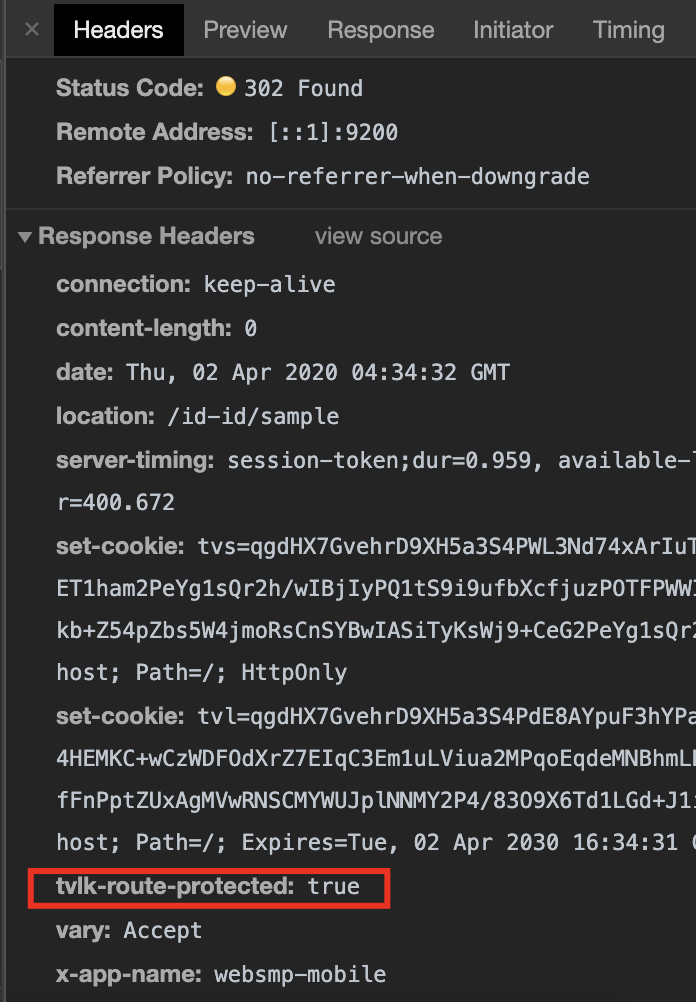
If you get non 2xx response and you don't see the header, you'll know it's not because your route was protected. This can help you decide whether the issue is in route protection logic or not (ALB, proxies, etc).