AB Test - Client
To enable A/B test on your page, what you need to do first is adding the A/B test "namespace(s)". If you don't understand what that is, consult with your data analyst. Internally, this flow rely on @traveloka/abtest-client and will be calculated on the client-side.
Setup
On a single page
Export Page.abTestNamespaces property on your page (you can specify multiple namespaces). This works on all types of pages (including getServerSideProps and getStaticProps).
import { TravelokaPageComponent } from '@traveloka/core';

const Page: TravelokaPageComponent => () => null;

Page.abTestNamespaces = ['experiment1', 'experiment2'];
On all pages
If you want to enable A/B test for all pages under your product, you can specify global namespaces in your _app by providing abTestNamespaces property when calling withTravelokaApp
By specifying global A/B test namespaces, every page will have their namespaces merged. Duplicate namespaces are automatically removed.
// pages/_app.tsx
import { withTravelokaApp } from '@traveloka/core';

export default withTravelokaApp({
  abTestNamespaces: ['experiment1'],
});
Usage
Note that AB test treatment is calculated in client-side, this is to make sure that rendered HTML result can be cached for faster performance.
useABTest
To give different treatments, you can call the useABTest hook that will return an object containing variant property. It defaults to control, and you can annotate what variants are possible for a better typecheck.
Calling this hook automatically send tracking data so you don't need to worry about that.
import React from 'react';
import { Button } from '@traveloka/web-components';
import { useABTest } from '@traveloka/core';

type ABTestVariant = 'primary' | 'secondary';

function ABTestButton(props: React.ComponentProps<typeof Button>) {
  const result = useABTest<ABTestVariant>('experiment');

  if (!result) {
    // server-side render
    return null;
  }

  if (result.variant === 'secondary') {
    return <Button {...props} variant="secondary" />;
  } else if (result.variant === 'primary') {
    return <Button {...props} variant="primary" />;
  } else {
    // variant === 'control'
    return <Button {...props} variant="main-cta" />;
  }
}
useABTestContext
If you need the raw data stored by the A/B test context, you can use the useABTestContext hook. (Usually used to detect loading state or loading failure.)
import { useABTest, useABTestContext } from '@traveloka/core';

function useSeamlessBookingABTest() {
  const abTestResult = useABTest(abTestBookingFlightForm);
  const { config, aBTestConfigAPIResponse } = useABTestContext();

  return {
    variant: abTestResult?.variant ?? 'CONTROL',
    isLoading: !aBTestConfigAPIResponse,
    isError: !aBTestConfigAPIResponse?.success,
  };
}
Devtools
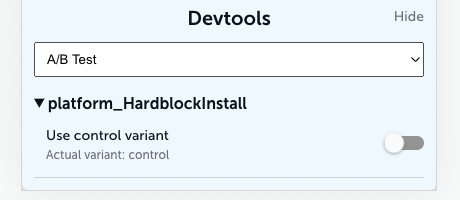
We also have an A/B test section on the devtools that allow you to see what variant you're currently in, and how to force the variant to control.